Decision Making

Changepoint Analysis

This time, we will do what is known as the change point analysis using the shark attack data that we used earlier. We use R programming to evaluate the key parameters.

First, we need the “changepoint” library to be installed. We use the function, “cpt.mean” which calculates the optimal positioning and the number of changepoints for data.

cpt.mean(inv_afr$AUS)
Class 'cpt' : Changepoint Object
       ~~   : S4 class containing 12 slots with names
              cpttype date version data.set method test.stat pen.type pen.value minseglen cpts ncpts.max param.est 

Created on  : Mon Jun 26 03:47:02 2023 

summary(.)  :
----------
Created Using changepoint version 2.2.4 
Changepoint type      : Change in mean 
Method of analysis    : AMOC 
Test Statistic  : Normal 
Type of penalty       : MBIC with value, 11.35257 
Minimum Segment Length : 1 
Maximum no. of cpts   : 1 
Changepoint Locations : 24 

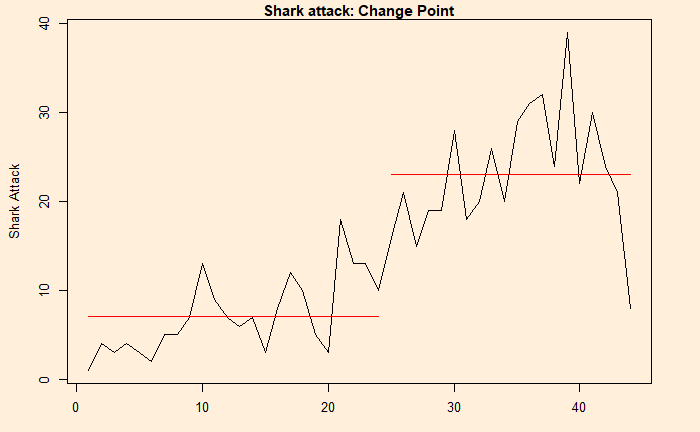
The program estimated the change point at 24. The next step is to plot and see what it did.

plot(cpt.mean(inv_afr$AUS))
Changepoint Analysis Read More »
Shark Attack and Randomness – A Case for Changepoint?

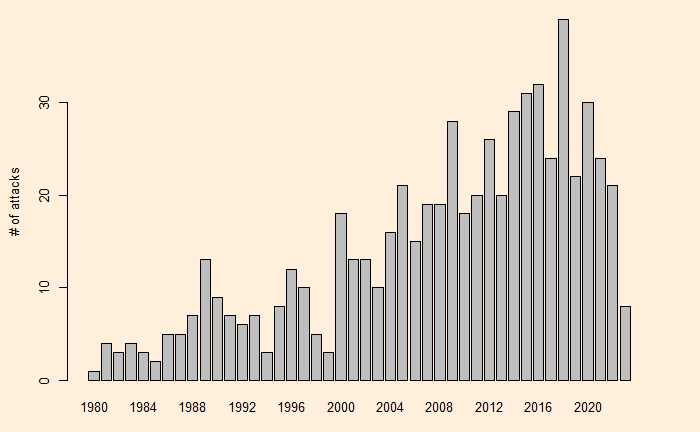
We have seen randomness explaining the ‘trends’ in shark attacks in South Africa. The next one is Australia. Here is the scatter from 1980-2023.

Scatter plot

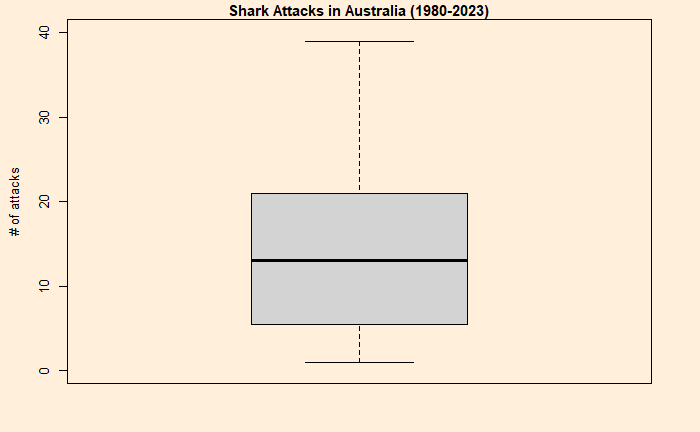
It looks like two different clusters or trends, as apparent from the plot, and the change point may have happened sometime in 2000. Another way of visualising the statistical summary is to build boxplots.

Boxplot summary

A t-test is handy here to test the hypothesis (that the two trends are just by chance or not).

T-test

Aus_before <- inv_afr$AUS[which(inv_afr$Year < 2000)]
Aus_after <- inv_afr$AUS[which(inv_afr$Year > 1999)]
t.test(Aus_before, Aus_after, var.equal = TRUE)
	Two Sample t-test

data:  Aus_before and Aus_after
t = -8.6826, df = 42, p-value = 6.378e-11
alternative hypothesis: true difference in means is not equal to 0
95 percent confidence interval:
 -19.28749 -12.01251
sample estimates:
mean of x mean of y 
     5.85     21.50 

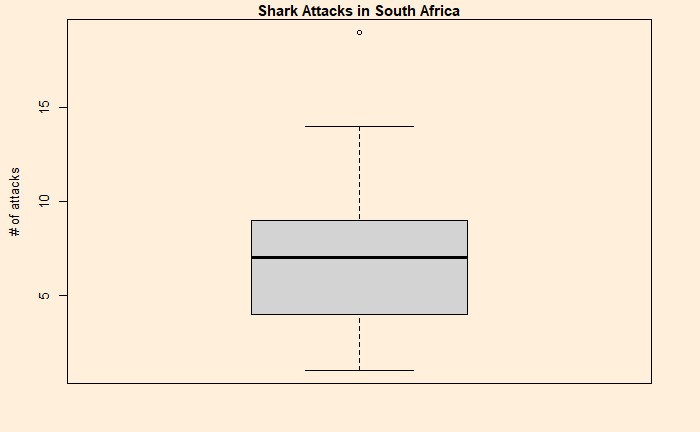
Comparison with South Africa

	Two Sample t-test

data:  SA_before and SA_after
t = 1.2881, df = 42, p-value = 0.2048
alternative hypothesis: true difference in means is not equal to 0
95 percent confidence interval:
 -0.8406907  3.8073574
sample estimates:
mean of x mean of y 
 7.900000  6.416667 

Unsurprisingly, the results show a p-value higher than the significant value (e.g., 0.05).

Shark Attack and Randomness – A Case for Changepoint? Read More »

Shark Attack and Randomness

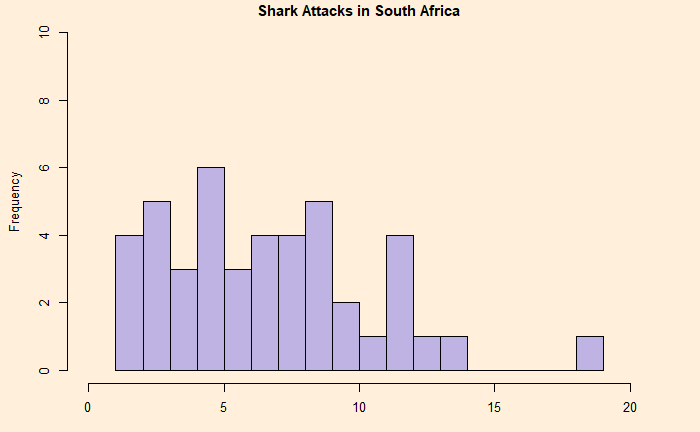
People often quote shark attacks as examples for explaining randomness. For one, they have been sporadic. For example, here are statistics from South Africa.

Global Shark Attack – Worldmarising the Statistics.

The plot looks decent except for one outlier – 19 – in 1998.

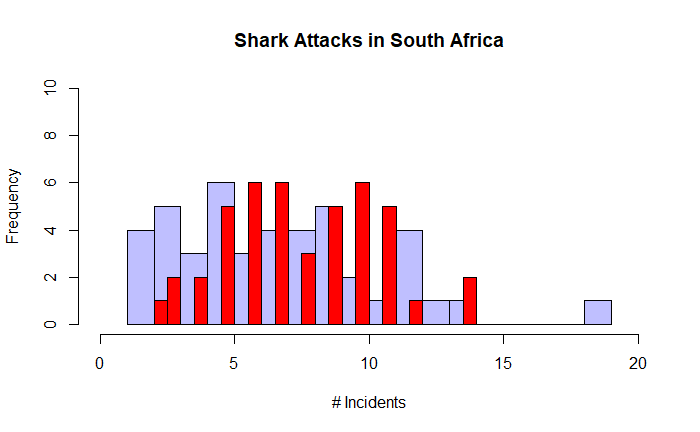
One way to understand the pattern is to run a simulation assuming randomness and then compare the outcomes. Poisson distribution is best suited to make the check. Here is what we can do.

First, we plot the distribution of the actual data (in blue), followed by a comparison with the Poisson (in red).

Except for the outlier, the two plots are reasonably in agreement. Then, what about the shark attacks in Australia? That comes next.

Shark Attack and Randomness Read More »

Card Game – Optimal Decisions

Here is a game of cards. A and B have two cards each – one green and one red. If A shows green and B shows green, A wins 5 – 0. If A shows green and B shows red, A loses 2 – 3. If A shows red and B shows green, A loses 0 – 5. If A shows red and B shows red, A wins 5 – 0. Here is the representation of the rules.

Looking carefully at the rule, you can conclude that the game is in A’s favour. But can A guarantee the maximum score, and how?

Here is the payoff matrix in the game theory format.

Before getting into the proper formulation, let’s check what happens if A plays only green. A might get a few wins early on, but once B figures out, she will play only red and win by 1 (2-3). On the other hand, if A plays only red, B will play green and win 5 (0-5).

A mixes up

Let A mixes up the play at a probability PAG for green (1 – PAG for red). If she aims to provide no incentive for B to show either green or red,
The payoff for B showing green = Payoff for B showing red
0 x PAG + 5 x (1-PAG) = 3 x PAG + 0 x (1-PAG)
5 – 5 PAG = 3PAG
PAG = 5/8 = 0.625

B mixes up

Naturally, B may respond by mixing her game, PBG for green. Using the same argument from B’s standpoint
The payoff for A showing green = Payoff for A showing red
5 x PBG + 2 x (1-PBG) = 0 x PBG + 5 x (1-PBG)
5PBG + 2 – 2PBG = 5 – 5PBG
PBG = 3/8 = 0.375

Equilibrium outcome

At these rates (PAG, PBG), the expected outcome for A is:
(5/8)(3/8)(5) + (5/8)(5/8)(2) + (3/8)(3/8)(0) + (3/8)(5/8)5 = 3.125

And the expected outcome for B is:
(5/8)(3/8)(0) + (5/8)(5/8)(3) + (3/8)(3/8)(5) + (3/8)(5/8)0 = 1.875

Card Game – Optimal Decisions Read More »

Mtcars Dataset – Pair Plots

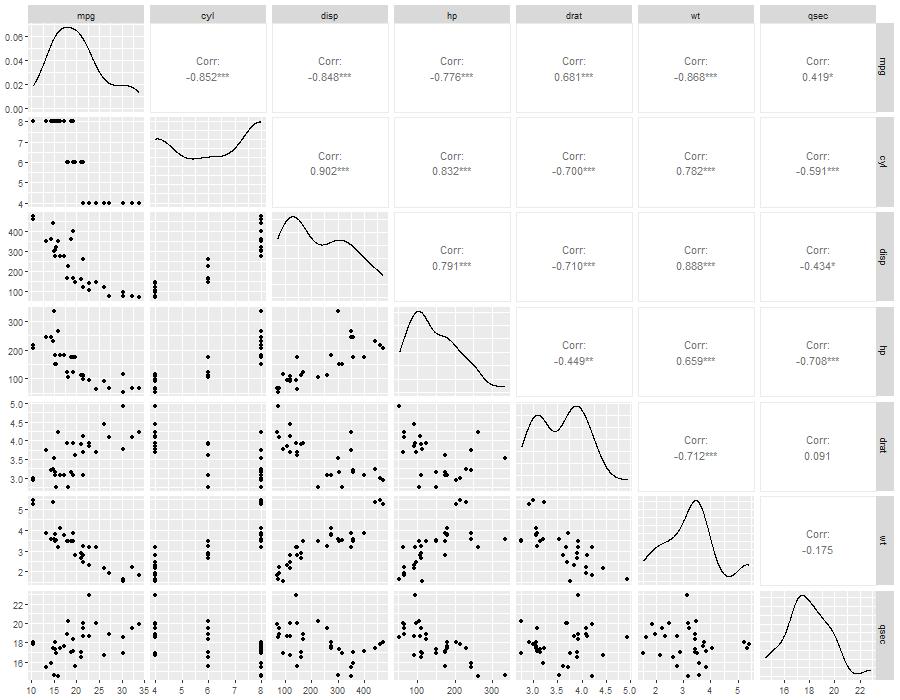
We continue with the mtcars dataset to illustrate a few more correlation plots – this time, the pair plots.

library(GGally)
ggpairs(car_data[,1:7])
  • The main diagonal represents the data distribution of the variable
  • The upper half diagonal represents the correlation coefficients
  • The lower half diagonal represents a scatter plot between pairs 
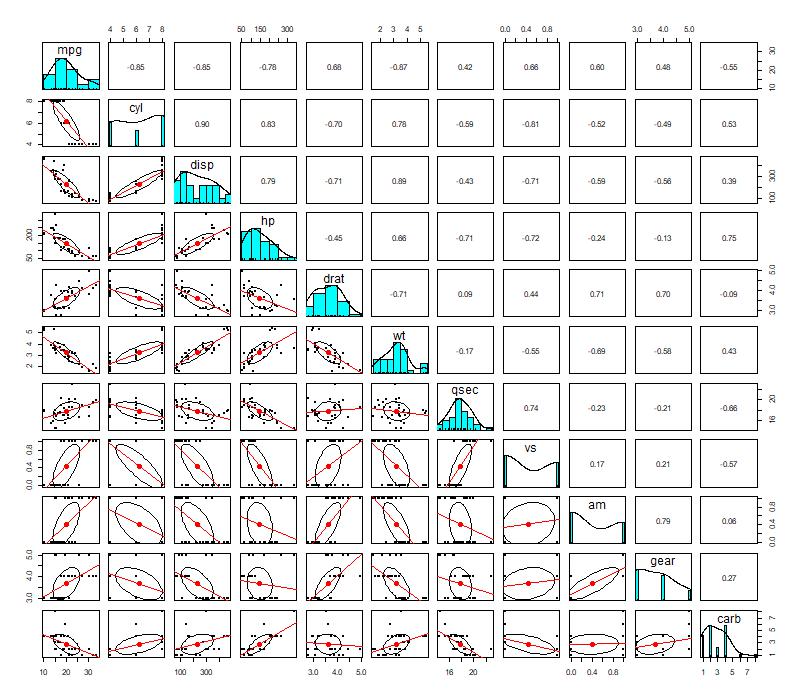
library(psych)
pairs.panels(car_data, lm = TRUE)

Mtcars Dataset – Pair Plots Read More »

Pearson vs Spearman Correlations

We have seen Pearson’s correlation coefficient earlier. There is a nonparametric alternative to this which is Spearman’s correlation coefficient.

Pearson’s is a choice when there is continuous data for a pair of variables, and the relationship follows a straight line. Whereas Spearman’s is the choice when you have a pair of continuous variables that do not follow a linear relationship, or you have a couple of ordinal data. Another difference is that Spearman correlates the rank of the variable, unlike Pearson (which uses the variable itself).

Rank of variables

A rank shows the position of the variable if the variable is organised in ascending order. The following is an example of a vector, xx and its rank.

VariableRank
103
21
345
214
52

Let’s apply each of the correlation coefficients to the mtcars database.

Pearson Method

cor.test(car_data$mpg, car_data$hp, method = "pearson")
	Pearson's product-moment correlation

data:  car_data$mpg and car_data$hp
t = -6.7424, df = 30, p-value = 1.788e-07
alternative hypothesis: true correlation is not equal to 0
95 percent confidence interval:
 -0.8852686 -0.5860994
sample estimates:
       cor 
-0.7761684 

Spearman Method

cor.test(car_data$mpg, car_data$hp, method = "spearman")
	Spearman's rank correlation rho

data:  car_data$mpg and car_data$hp
S = 10337, p-value = 5.086e-12
alternative hypothesis: true rho is not equal to 0
sample estimates:
       rho 
-0.8946646 

Spearman via Pearson!

cor.test(rank(car_data$mpg), rank(car_data$hp), method = "pearson")
	Pearson's product-moment correlation

data:  rank(car_data$mpg) and rank(car_data$hp)
t = -10.969, df = 30, p-value = 5.086e-12
alternative hypothesis: true correlation is not equal to 0
95 percent confidence interval:
 -0.9477078 -0.7935207
sample estimates:
       cor 
-0.8946646 

Pearson vs Spearman Correlations Read More »

mtcars Dataset – Correlation Plots

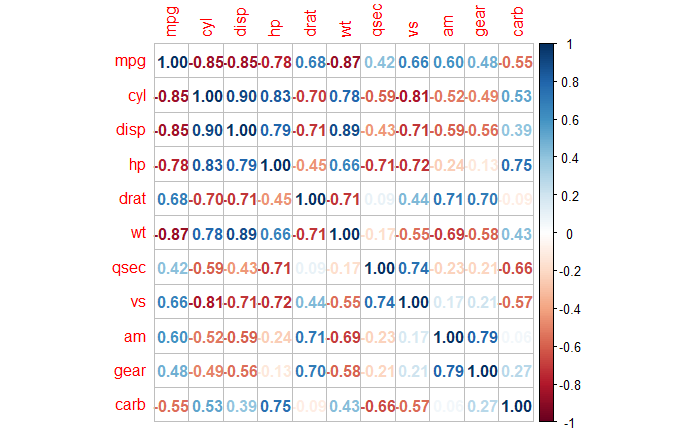
In exploratory data analyses, you may want to check the correlations – the strength and the direction – in one go. And a correlation matrix can give that snapshot. Following is the R code to get the matrix.

corrplot(corr = cor(car_data), method = 'number')

As we discussed in the previous posts, a higher positive number (blue) denotes a stronger positive correlation between the variables (pairwise), and the negative (red) indicates the opposite.

Let’s work on various other ways of visualising the same using R.

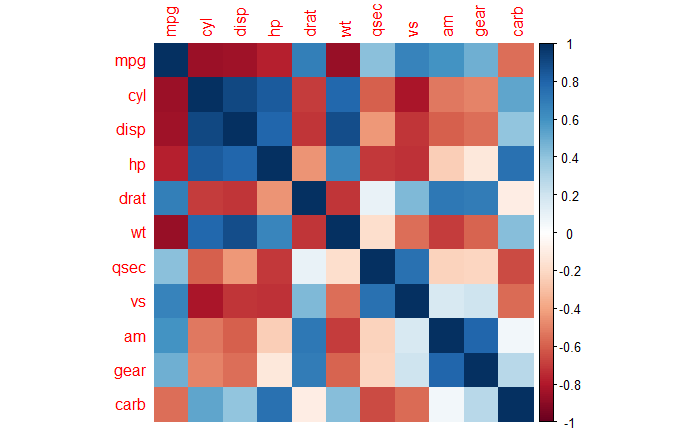
As a colour map

corrplot(corr = cor(car_data), method = 'color')

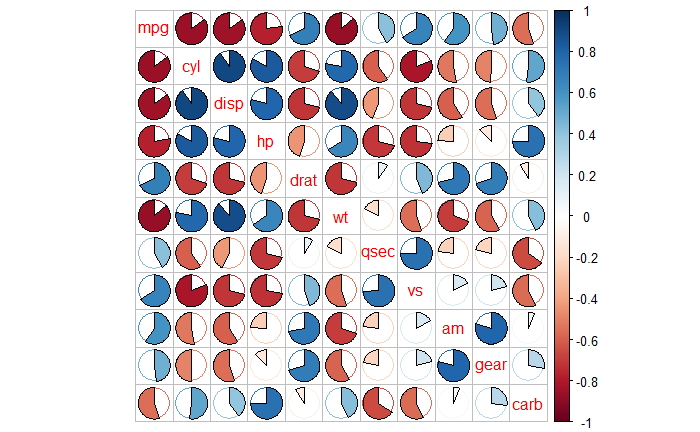
As a pie chart and labels inside

corrplot(corr = cor(car_data), method = 'pie', tl.pos = 'd')

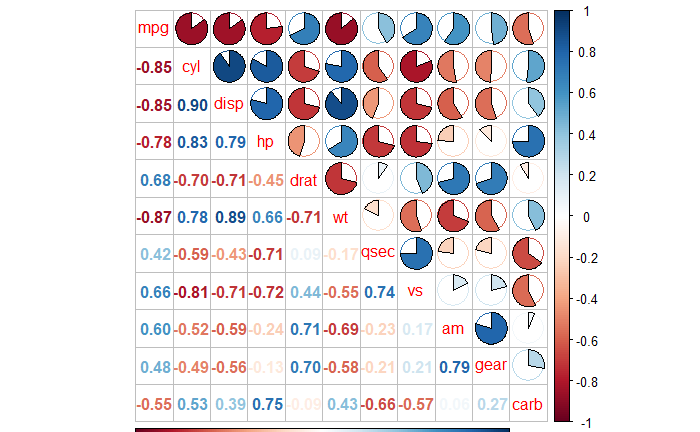
Having mixed visualisations for upper and lower triangles

corrplot(cor(car_data), type = 'upper', method = 'pie', tl.pos = "d")
corrplot(cor(car_data), type = 'lower', method = 'number', add = TRUE, tl.pos = "n", diag = FALSE)

mtcars Dataset – Correlation Plots Read More »

mtcars Dataset – Correlation Coefficient

We have seen a couple of plots showing relationships between variables in the ‘mtcars‘ database.

Statisticians use single numbers to quantify the strength and direction of the relationship. One of them is the correlation coefficient which quantifies linear relationships. Before going into correlation coefficients, let’s first learn the covariance between two variables.

Covariance

The sample covariance among two variables based on N observations of each is,

Cov(x,y) = \frac{1}{N-1}\sum\limits^{N}_{i = 1} (x_i - \bar{x}) * (y_i - \bar{y})

You see N − 1 in the denominator rather than N when the population mean is not known and is replaced by the sample mean (X bar).

sum((car_data$mpg - mean(car_data$mpg))*(car_data$cyl - mean(car_data$cyl))) / 31

Or simply,

cov(car_data$mpg, car_data$cyl)
-9.17

Correlation coefficient

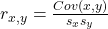
The Pearson correlation coefficient is the covariance of the two variables divided by the product of their standard deviations.

r_{x,y} = \frac{Cov(x,y)}{s_xs_y}

cov(car_data$mpg, car_data$cyl) /(sd(car_data$mpg)*sd(car_data$cyl))

Or use the following command from ‘corrplot‘ package

cor(car_data$mpg, car_data$cyl)
-0.85

The greater the absolute value of the correlation coefficient, the stronger the relationship. The maximum value is 1 (+1 and -1), which represents a perfectly linear relationship. A positive value means when one variable increases, the other one also increases. On the other hand, a negative value suggests when one value increases, the other decreases.

In exploratory analyses, however, you may want to know the relationships between several variables in one go. That is the topic for the next post.

References

The Correlation Coefficient: Investopedia
Covariance: Wiki

mtcars Dataset – Correlation Coefficient Read More »

Correlation and mtcars Dataset

‘mtcars’ is a popular dataset which is used to illustrate a bunch of statistical concepts. The data is collected from the 1974 Motor Trend US magazine and comprises fuel consumption and ten aspects of automobile design and performance for 32 automobiles (1973–74 models). It is a built-in dataset in R, and the first few lines may be seen using the following command.

head(mtcars)

The following are the variables in the set.

VariableExplanation
mpgMiles
(US) gallon
cyl# of cylinders
dispDisplacement
(cu.in.)
hpGross horsepower
dratRear axle ratio
wtWeight
(1000 lbs)
qsec1/4 mile time
vsEngine
(0 = V-shaped,
1 = straight)
amTransmission
(0 = automatic,
1 = manual)
gear# of forward gears
carb# of carburettors

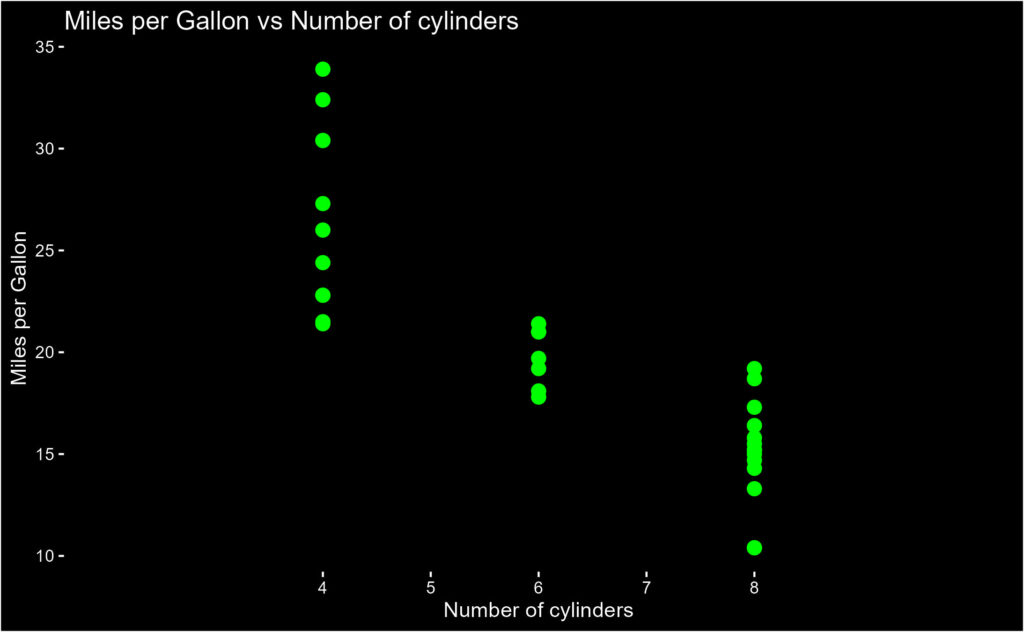
The data enables one to find out the relationship between the different characteristics with the fuel efficiency of cars. E.g., the following plot relates the miles per gallon with the number of cylinders.

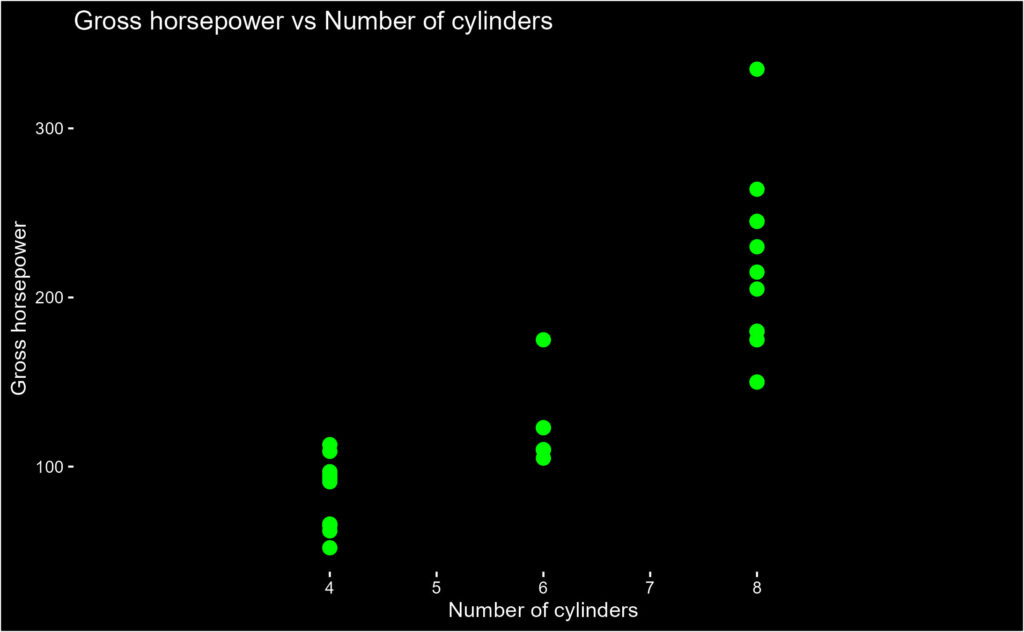
Or how the gross horsepower is related to the number of cylinders.

Correlation and mtcars Dataset Read More »